2 · Serving the experiment
About 45 minutes
Image: Wikimedia Commons, CC0.

By the end of this chapter a real jsPsych study will run in the browser, served by your Django app. Here's a live demo.

The plan
We need:
- a directory to hold jsPsych
- a view that is called when someone visits your URL suffixed with
/study/<slug>/ - a template that combines the researcher's timeline code with jsPsych to run your study
Keep jsPsych local
Download the
jsPsych library files
(the jspsych.zip attached to a release). Create the folders study/static/study/jspsych/, then copy everything from the zip's dist/ folder into it. You don't need anything else from the zip.
Why study/static/study/ and not just study/static/?
That doubled-up folder name looks like a mistake, but it isn't! Django searches every app's static directory and uses
the first filename-matching file it finds in a specific subfolder. The same rule applies when
collectstatic gathers files for deployment: it copies the first match and ignores
later files with the same path. If two apps both shipped
jspsych.js directly in their static/ folder, Django could not distinguish between
them, and which file won would depend on the order in which its static-file finders
searched those locations.
Putting the files inside a second folder named after the app gives every file a unique
path (study/jspsych/jspsych.js), so there's nothing to collide. Django's own
tutorial explains this under
"Static file namespacing".
They end up here:
study/
└── static/
    └── study/
        └── jspsych/
            ├── jspsych.css                       the look of the trials
            ├── jspsych.js                        the core library
            ├── survey.min.css                    styles for the survey plugin
            ├── plugin-animation.js               one file per trial type…
            ├── plugin-audio-button-response.js
            ├── …                                 (42 or 53 of them)
            └── plugin-visual-search-circle.js
jsPsych loads each trial type from its own plugin file. A timeline can only use the trial types whose plugin files the page has loaded.
That's easy in a standalone experiment, where you know your own trial types and add a
<script> for each. A platform though needs to take into account that a future study may require any of the plugins...
So we add all of them, and (for the time being) we load all of them for each study (there's a note below though on how to build a system to only load in modules that are needed for a given study). You copied every plugin-*.js along with the rest of dist/, so there's nothing more to do here.
Getting all 53 files
This tutorial was built with jsPsych 8.2.3. The
8.2.3 zip holds the
core library plus 42 of the plugins. The other 11 (survey-text, the video-* set,
virtual-chinrest, visual-search-circle and the webgazer-* set) are published
only as separate packages.
The newer 8.3.0 zip
includes all 53. Either is enough for this tutorial.
The sizes on this page are for the minified files this app ships. The zip's files are unminified and roughly twice as big, but the proportions hold.
One exception is worth knowing about. At 1.3 MB, plugin-survey.js is almost five
times larger than all the other plugins combined (269 KB) because it includes the
complete SurveyJS library.
Our load-everything approach means every participant
downloads it, even when a study does not use surveys. That is the trade-off for avoiding
per-study plugin lists.
The view
Open study/views.py.
Add the imports below, replacing the existing render import. You'll add more imports as you work through the chapters.
You'll create study/jspsych.py at the end of this chapter. Until then, Django will report ModuleNotFoundError: No module named 'study.jspsych'. That's expected for now.
from django.shortcuts import render, get_object_or_404

from .jspsych import plugin_files
from .models import Study
Then add a view that looks up the study by its slug and sends the study (and other information) to a template:
def study_detail(request, slug):
    """Serve a single study to a participant.

    The study is identified by a *path* parameter (``slug``, matched by the URL
    pattern); the participant and condition arrive as *query* parameters, e.g.
    ``/study/flanker/?participant_id=p01&condition=A``. We read them here on the
    server and pass them into the template.
    """
    study = get_object_or_404(Study, slug=slug)

    # ?preview=1 runs the study but skips saving (see the template). Match "1" exactly, so
    # ?preview=0 doesn't accidentally turn it on.
    preview = request.GET.get("preview") == "1"
    participant_id = request.GET.get("participant_id", "")
    condition = request.GET.get("condition", "")

    context = {
        "study": study,

        # maybe we want to give a collaborator our draft study but we dont
        # want their data to save. Preview lets us do this.
        "preview": preview,

        # Every plugin. The researcher's pasted code can use any trial type
        # without telling us which, so the page is given them all (see study.jspsych).
        "jspsych_plugins": plugin_files(),

        # Who is doing the study, and which condition they're in, read from the query string
        # so the front-end never has to parse the URL itself.
        "participant_id": participant_id,
        "condition": condition,
    }
    return render(request, "study/study_detail.html", context)
Don't worry about the participant_id and condition lines yet as we cover that later. For now
the important part is the last line where we find the study and render a template with it.
Next, we need to create
study/urls.py and add the below to it:
from django.urls import path

from . import views

app_name = "study"

urlpatterns = [
    path("study/<slug:slug>/", views.study_detail, name="detail"),
]
Above, see <slug:slug>; that's a placeholder. A request for /study/flanker/ sets
slug to "flanker", and this is sent to the view in the slug parameter.
One easy thing to miss is that the project doesn't know your app's urls.py exists until you
include it. In config/urls.py, add the include (and import it). The whole file should now read:
from django.contrib import admin
from django.urls import include, path

urlpatterns = [
    path("admin/", admin.site.urls),
    path("", include("study.urls")),   # hand every non-admin URL to the study app
]
config/urls.py is the entry to your app. Django checks every incoming URL against the patterns defined in there first. The admin pattern handles /admin/, while include() passes the
URLs reaching that point to study/urls.py for a more specific match. In this fashion, app-specific
routes are stored within that app's own urls.py file.
     a participant asks for /study/flanker/
                        │
                        ▼
   ┌─────────────────────────────────────────┐
   │ config/urls.py            THE FRONT DOOR│
   ├─────────────────────────────────────────┤
   │ path("admin/", admin.site.urls)         │
   │ path("", include("study.urls"))         │
   └─────────────────────────────────────────┘
                        │
    nothing matches /admin/, so the catch-all
     include hands the URL to the study app
                        │
                        ▼
   ┌─────────────────────────────────────────┐
   │ study/urls.py         THE APP'S OWN MAP │
   ├─────────────────────────────────────────┤
   │ path("study/<slug:slug>/", study_detail)│
   └─────────────────────────────────────────┘
                        │
             match! slug = "flanker"
                        │
                        ▼
   views.study_detail(request, slug="flanker")
Django tries the patterns in order and stops at the first match.
The template
The view above renders study/study_detail.html. Let's make that now.
Templates live in a templates/ folder inside the app. Create
study/templates/study/study_detail.html and add the below.
{% load static %}
<!DOCTYPE html>
<html lang="en">
<head>
    <meta charset="utf-8">
    <title>{{ study.name }}</title>
    <link rel="stylesheet" href="{% static 'study/jspsych/jspsych.css' %}">
    <link rel="stylesheet" href="{% static 'study/jspsych/survey.min.css' %}">
    <script src="{% static 'study/jspsych/jspsych.js' %}"></script>
    {% for plugin in jspsych_plugins %}<script src="{% static 'study/jspsych/'|add:plugin %}"></script>
    {% endfor %}
</head>
<body>
<script>
    // chapters 3 and 4 add their lines here, above initJsPsych

    const jsPsych = jsPsychModule.initJsPsych({ /* ...on_finish, chapter 4... */ });
    let timeline = [];

    {{ study.code|safe }}   {# the researcher's pasted timeline goes here #}

    jsPsych.run(timeline);
</script>
</body>
</html>
study/templates/study/study_detail.html on GitHub
The first line, {% load static %}, lets you use {% static %} to turn a file path into
the URL the file is served from. Leave it out and you'll get this error: Invalid block tag ... 'static'.
Add it to every template that uses {% static %}, as it isn't inherited.
In a nutshell, the platform loads jsPsych. You, the researcher, then provide the code that fills a space for the jsPsych timeline, replacing {{ study.code|safe }} shown above.
Which plugins to load
In this tutorial we load all the jspsych_plugins so they are available for whatever study
the researcher has designed. To achieve this, the app reads the plugin folder and hands the
template every file it finds. Create study/jspsych.py:
from functools import cache
from pathlib import Path

PLUGIN_DIR = Path(__file__).resolve().parent / "static" / "study" / "jspsych"


@cache
def plugin_files():
    """Every vendored ``plugin-*.js``, sorted so the page's script order is stable."""
    return sorted(path.name for path in PLUGIN_DIR.glob("plugin-*.js"))
Could we load only the plugins each study uses?
Absolutely. Give Study a plugins field (a
JSONField holding a list of filenames), show the files as a tick-list on
the admin form, and load only the files that are ticked. An empty
selection would mean "load everything", so a half-drafted study still runs.
Via this method, a study page currently carries about 2.4 MB: the 53 plugins
(1.6 MB, of which plugin-survey.js alone is 1.3 MB), the core library (77 KB) and the
two stylesheets (770 KB). The seeded Flanker task uses exactly one trial type, so
picking plugins would serve it in 544 KB, a saving of roughly 1.9 MB.
Why not build that here? It would add about 70 lines across the model, a custom admin form, a helper, and a migration. More importantly, researchers would have to select the right plugins for their study, and if they miss one out, the experiment fails to run.
Note that if you never use surveys, you can just remove
plugin-survey.js and survey.min.css from study/static/study/jspsych/, reducing page load from 2.4 MB to 810 KB.
Add some studies
Start the server:
Open http://127.0.0.1:8000/admin/, log in with the superuser you made in chapter 1, and click Studies → Add study. Fill in three fields:
- Name:
Flanker task - Slug: this fills itself in from the name as
flanker-task. Change it to justflanker, so the address (/study/flanker/) matches the links in this tutorial - Code: paste one of the timelines below
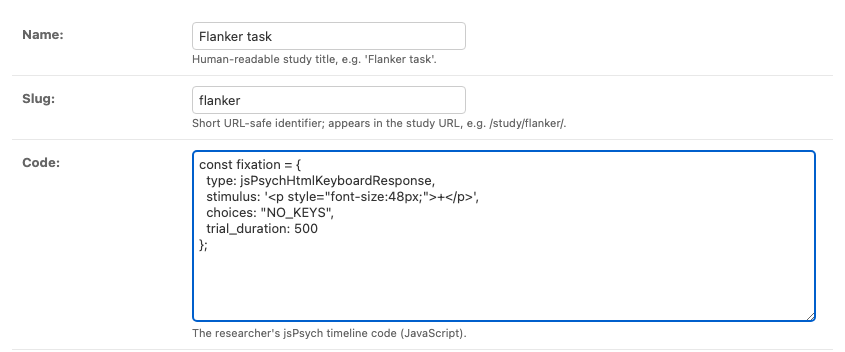
code takes the timeline as-is.Save it, and the study is live at http://127.0.0.1:8000/study/flanker/.
Flanker task: study/seed_studies/flanker.js
Respond to the centre arrow while the flanking arrows agree (<<<<<) or disagree
(>><>>) with it. Uses one plugin, html-keyboard-response.
// Minimal Flanker task: respond to the CENTRE arrow (f = left, j = right).
// This is a jsPsych timeline. Paste it into a new study's "code" field in the admin.
// (The finished app also loads it for you, in a seed migration.)
const fixation = {
type: jsPsychHtmlKeyboardResponse,
stimulus: '<p style="font-size:48px;">+</p>',
choices: "NO_KEYS",
trial_duration: 500
};
const flanker = {
type: jsPsychHtmlKeyboardResponse,
stimulus: jsPsych.timelineVariable('stimulus'),
choices: ['f', 'j'],
data: {
congruency: jsPsych.timelineVariable('congruency'),
correct_response: jsPsych.timelineVariable('correct_response')
},
on_finish: function (data) {
data.correct = jsPsych.pluginAPI.compareKeys(data.response, data.correct_response);
}
};
const instructions = {
type: jsPsychHtmlKeyboardResponse,
stimulus: '<p>Press <b>f</b> if the CENTRE arrow points left, <b>j</b> if it points right.</p>' +
'<p>Press any key to begin.</p>'
};
timeline.push(instructions);
timeline.push({
timeline: [fixation, flanker],
timeline_variables: [
{ stimulus: '<p style="font-size:48px;letter-spacing:8px;"><<<<<</p>', congruency: 'congruent', correct_response: 'f' },
{ stimulus: '<p style="font-size:48px;letter-spacing:8px;">>>>>></p>', congruency: 'congruent', correct_response: 'j' },
{ stimulus: '<p style="font-size:48px;letter-spacing:8px;">>><>></p>', congruency: 'incongruent', correct_response: 'f' },
{ stimulus: '<p style="font-size:48px;letter-spacing:8px;"><<><<</p>', congruency: 'incongruent', correct_response: 'j' }
],
randomize_order: true,
repetitions: 2
});
Stroop task: study/seed_studies/stroop.js
Name the ink colour of a colour word, where word and ink match or clash. Also one
plugin, html-keyboard-response.
// Minimal Stroop task: respond to the INK colour (r = red, g = green, b = blue).
// This is a jsPsych timeline. Paste it into a new study's "code" field in the admin.
// (The finished app also loads it for you, in a seed migration.)
const fixation = {
  type: jsPsychHtmlKeyboardResponse,
  stimulus: '<p style="font-size:48px;">+</p>',
  choices: "NO_KEYS",
  trial_duration: 500
};

const stroop = {
  type: jsPsychHtmlKeyboardResponse,
  stimulus: jsPsych.timelineVariable('stimulus'),
  choices: ['r', 'g', 'b'],
  data: {
    congruency: jsPsych.timelineVariable('congruency'),
    correct_response: jsPsych.timelineVariable('correct_response')
  },
  on_finish: function (data) {
    data.correct = jsPsych.pluginAPI.compareKeys(data.response, data.correct_response);
  }
};

const instructions = {
  type: jsPsychHtmlKeyboardResponse,
  stimulus: '<p>Respond to the INK colour: <b>r</b> = red, <b>g</b> = green, <b>b</b> = blue.</p>' +
            '<p>Press any key to begin.</p>'
};

timeline.push(instructions);
timeline.push({
  timeline: [fixation, stroop],
  timeline_variables: [
    { stimulus: '<span style="color:red;font-size:48px;">RED</span>',     congruency: 'congruent',  correct_response: 'r' },
    { stimulus: '<span style="color:green;font-size:48px;">GREEN</span>', congruency: 'congruent',  correct_response: 'g' },
    { stimulus: '<span style="color:blue;font-size:48px;">RED</span>',    congruency: 'incongruent', correct_response: 'b' },
    { stimulus: '<span style="color:red;font-size:48px;">GREEN</span>',   congruency: 'incongruent', correct_response: 'r' }
  ],
  randomize_order: true,
  repetitions: 2
});
I've found a jsPsych study on the web. What code do I copy from it to get it to work here?
Just the JavaScript that builds your trials, not a whole HTML page. The platform
already calls initJsPsych() and jsPsych.run(timeline) for you, so your code should
push its trials onto the timeline that's already there and leave the setup alone.
A standalone experiment that starts like this:
becomes just this when pasted in:
Open http://127.0.0.1:8000/study/flanker/. You should get the instructions screen from
the top of this chapter; press a key and the trials begin. That's your Django backend
serving a live jsPsych experiment.
The study now runs, but we don't yet know who is doing the study. That's what we explore next.