4a · Capturing the data
About 45 minutes
By the end of this chapter, when a participant finishes a study, their data will be stored and they will be thanked for completing the study.
participant finishes the study
        │
        └── POST /api/study/<slug>/data  (JSON) ──►  Django view ──► database (one StudyData row)
These are the steps we need to complete here:
- Server side: two models are set up to hold the data, and a view receives it
- Browser side: a few lines of code in the study's template send the data when the study ends
The idea

Photo: Andrey Zeigarnik, public domain, via Wikimedia Commons.

jsPsych collects data throughout the study and hands it all to Django at once when the
timeline ends, through its on_finish callback.
Two advanced points
- We send the data as
JSON
(a popular data format) in a
POSTrequest.GETis for asking;POSTis for sending something to be stored - We leave Django's CSRF protection
switched on. Cross-site request forgery
is the trick where another website quietly makes your browser send a request to our
server, riding on the fact that your browser attaches your cookies to it. The defence is
a secret token that Django puts in the page and expects back with every
POST: another site can make your browser send a request, but it can't read our page to find the token
The models that store the data
We need two new models:
Participant (who did it) and StudyData (one participant's whole run, with every trial
in a single field). Add them at the bottom of study/models.py, below Study (StudyData refers to Study, so it has to come after it):
class Participant(models.Model):
    """A person completing studies, identified by the ``participant_id`` URL param."""

    external_id = models.CharField(
        max_length=200,
        unique=True,
        # Nullable so the recruitment ID can be removed without destroying the row. A
        # blank string wouldn't do: the second anonymised participant would collide on
        # the unique constraint, where NULLs don't count as equal to one another.
        null=True,
        blank=True,
        help_text="The participant_id passed in the study URL",
    )
    created = models.DateTimeField(auto_now_add=True)

    def __str__(self):
        return self.external_id or f"anonymised participant #{self.pk}"

    def anonymise(self):
        """Deletes the recruitment ID, keeping the runs grouped as one person.
        """
        self.external_id = None
        self.save()


class StudyData(models.Model):
    """One participant's whole run of a study: every trial in a single ``JSONField``.

    jsPsych hands us study data as an array of trial objects, and we store it exactly as it arrived.
    """

    study = models.ForeignKey(Study, on_delete=models.CASCADE, related_name="datasets")
    participant = models.ForeignKey(
        Participant, on_delete=models.SET_NULL, null=True, blank=True, related_name="datasets"
    )
    condition = models.CharField(max_length=100, blank=True)
    data = models.JSONField(help_text="The whole jsPsych run: a list of trial objects.")
    created = models.DateTimeField(auto_now_add=True)

    # This section tells your database how to order data when it is returned to you. Django now also knows how you prefer data from this table to be called.
    class Meta:
        ordering = ["-created"]
        verbose_name_plural = "study data"

    def __str__(self):
        return f"{self.study.slug} data #{self.pk}"
Then create the database tables for them:
Remind me: how do I run a migration?
Changing a model changes the shape your database needs to be. makemigrations works
out what changed and writes it down as a migration file; migrate applies that file to
the database. Two commands, every time, in that order:
uv run python manage.py makemigrations   # write the migration from your model changes
uv run python manage.py migrate          # apply it to the database
The migration file is code, so commit it alongside the model change. That's what makes your database schema travel with the project.
Don't worry too much about concepts such as ForeignKeys, on_delete
rules and JSONField. What matters here is that a StudyData row belongs to one study and
one participant, and holds this person's data as JSON. Register them in the admin so you can
see the data land, adding to study/admin.py (the first line replaces your existing from .models import Study):
from .models import Participant, Study, StudyData

@admin.register(StudyData)
class StudyDataAdmin(admin.ModelAdmin):
    list_display = ["id", "study", "participant", "condition", "created"]
    list_filter = ["study", "condition"]
    readonly_fields = ["study", "participant", "condition", "data", "created"]  # captured data: show it, don't edit it

admin.site.register(Participant)
Both of these links are one-to-many: a study has many datasets, a participant has many
datasets, and each dataset belongs to exactly one of each. The other kind of link, many-to-many,
fits when a study has several owners and each of those researchers runs several
studies. Study ownership in the Going further
section adds a Researcher model and links it to Study this way.
The endpoint
Here's the view that receives the data. It needs a few more imports, so first make the top of study/views.py read:
import json

from django.http import HttpResponseBadRequest, JsonResponse
from django.shortcuts import get_object_or_404, render
from django.views.decorators.http import require_POST

from .jspsych import plugin_files
from .models import Participant, Study, StudyData
Then add the view to study/views.py, below study_detail.
@require_POST  # a GET (or anything but POST) gets a 405; this endpoint only receives data
def submit_data(request, slug):
    """Receive the trial data jsPsych posts at the end of a study.
    """
    study = get_object_or_404(Study, slug=slug)  # this is a bit of Django magic. If our database can't find the slug in question, the participant is immediately shown a 404 page

    # Everything in the body came from the open internet, so it's checked before we
    # touch the database by parse_submission
    try:
        participant_id, condition, trials = parse_submission(request.body)
    except SubmissionError as exc:
        return HttpResponseBadRequest(str(exc))

    # Look up (or create) the participant, then store their whole run as one row.
    # get_or_create returns a (object, created) tuple; we only want the object, so we
    # unpack the "created" flag into `_`, the conventional name for a value to ignore.
    participant = None
    if participant_id:
        participant, _ = Participant.objects.get_or_create(external_id=participant_id)
    dataset = StudyData.objects.create(
        study=study, participant=participant, condition=condition, data=trials
    )

    # A reply, so the front-end can show its thank-you message.
    return JsonResponse({"status": "ok", "id": dataset.pk})
submit_data hands the checking to parse_submission, which raises a SubmissionError
when the body isn't usable. Add both below submit_data:
# A public endpoint shouldn't accept an unbounded run. This caps the trials in one
# submission; Django's DATA_UPLOAD_MAX_MEMORY_SIZE (2.5 MB by default) caps the raw body.
MAX_TRIALS = 10_000


class SubmissionError(Exception):
    """The posted body isn't a usable submission. The message is safe to show."""


def parse_submission(body):
    """Check a posted body and return the ``(participant_id, condition, trials)`` in it.

    Anyone can send data to this public URL, so every field is checked before it
    reaches the database. Invalid data raises ``SubmissionError`` instead of
    returning an error value. ``submit_data`` catches it in one place, letting
    the remaining code read straight through without an error check after each step.
    """
    # jsPsych sends a JSON body like {participant_id, condition, trials: [...]}.
    # Reject anything malformed with a 400 rather than storing half of it. Valid JSON
    # of the wrong shape (a bare list, null, a string) is still bad input, so check
    # the top level is an object before we start calling .get() on it. (UnicodeDecodeError:
    # a body that isn't valid UTF-8 fails before it can fail as JSON.)
    try:
        payload = json.loads(body)
    except (json.JSONDecodeError, UnicodeDecodeError):
        raise SubmissionError("Request body must be valid JSON.") from None
    if not isinstance(payload, dict):
        raise SubmissionError("JSON body must be an object.")

    # A JSONField would happily store a number where we expect a string, and creating a
    # model doesn't run field validation for us, so this is where we enforce the contract.
    participant_id = payload.get("participant_id", "")
    condition = payload.get("condition", "")
    trials = payload.get("trials")
    if not isinstance(participant_id, str) or len(participant_id) > 200:
        raise SubmissionError("'participant_id' must be a string of at most 200 characters.")
    if not isinstance(condition, str) or len(condition) > 100:
        raise SubmissionError("'condition' must be a string of at most 100 characters.")
    # A whitespace-only ID is no ID.
    participant_id = participant_id.strip()
    condition = condition.strip()
    if not isinstance(trials, list):
        raise SubmissionError("'trials' must be a list.")
    if len(trials) > MAX_TRIALS:
        raise SubmissionError(f"Too many trials (max {MAX_TRIALS}).")
    if not all(isinstance(trial, dict) for trial in trials):
        raise SubmissionError("Every trial must be a JSON object.")

    return participant_id, condition, trials
Everything in the body came from the open internet, so each field is checked for type and size before any of it reaches the database.
Wire it into the app's URLs, adding this line inside the urlpatterns list in study/urls.py, below the study/<slug:slug>/ path:
Sending the data from jsPsych
In the front end, we tell jsPsych what to do when the study finishes: on_finish runs the saveData function, which posts the collected trials to the endpoint.
saveData needs to know two things the server has: the address to post to, and Django's
CSRF token. Add these two lines to study/templates/study/study_detail.html, next to the
PARTICIPANT_ID and CONDITION lines from chapter 3:
study/templates/study/study_detail.html on GitHub
{{ csrf_token }} puts the secret token into the page (and sets the matching cookie), and
{% url %} builds the endpoint's address from its name, study:data, the same way
reverse() does in Python.
Then add saveData below them, and replace chapter 2's initJsPsych line with the one
at the bottom of this block:
function saveData() {
const message = html => document.body.innerHTML =
"<div style='text-align:center;margin-top:3em;'>" + html + "</div>";
message("<p>Saving your data, please don't close this window...</p>");
return fetch(DATA_URL, {
method: "POST",
mode: "same-origin", // don't send the CSRF token off-origin
headers: {"Content-Type": "application/json", "X-CSRFToken": CSRF_TOKEN},
body: JSON.stringify({
participant_id: PARTICIPANT_ID,
condition: CONDITION,
trials: jsPsych.data.get().values()
})
})
.then(response => {
if (!response.ok) throw new Error("HTTP " + response.status); // 4xx/5xx isn't success
return response.json();
})
.then(result => {
message("<p>Thank you, your data has been saved.</p>");
})
.catch(() => {
// keep the data in the page and let them retry rather than losing the run
message("<p>Sorry, saving failed.</p>" +
"<button onclick='saveData()'>Try again</button>");
});
}
const jsPsych = jsPsychModule.initJsPsych({ on_finish: saveData });
study/templates/study/study_detail.html on GitHub
fetch sends the request. The .then steps run later, once the
server's reply arrives, and .catch runs if anything along the way fails.
Following one submission through (optional, for the curious)
Here's one submission traced from start to finish. To keep
it readable, imagine a cut-down Flanker run with just two trials, opened at
/study/flanker/?participant_id=p01&condition=A.
-
Browser. As each trial ends, jsPsych adds an object to its data store. After two trials,
jsPsych.data.get().values()returns this (a real record has a few more fields, such asstimulusandtime_elapsed): -
Browser. The timeline ends, so
on_finishcallssaveData. The participant sees "Saving your data, please don't close this window...". ThensaveDatapacks three things into one data packet: the participant's ID (PARTICIPANT_ID) and their condition (CONDITION), which chapter 3 read from the study link, plus the list of trials: -
Browser.
fetchPOSTs that text to/api/study/flanker/data, with the CSRF token in itsX-CSRFTokenheader - Server. Django's CSRF check compares the token in the header with the CSRF cookie. If it's missing
or wrong, the reply is
403 Forbiddenand your view never runs - Server. The URL matches
api/study/<slug:slug>/data, so Django callssubmit_data(request, slug="flanker").@require_POSTlets a POST through, andget_object_or_404finds the Flanker study - Server.
parse_submissionchecks the body. It's valid JSON and an object;"p01"and"A"are short strings;trialsis a list of two objects, well under the 10,000 limit. So it returns("p01", "A", [...the two trials...]). Had any check failed, it would raiseSubmissionError, the reply would be400 Bad Request(for example'trials' must be a list.), and nothing would be saved - Server.
Participant.objects.get_or_create(external_id="p01")finds nop01, so it creates one. Ifp01comes back for a second run, the same line finds that existing row instead -
Server.
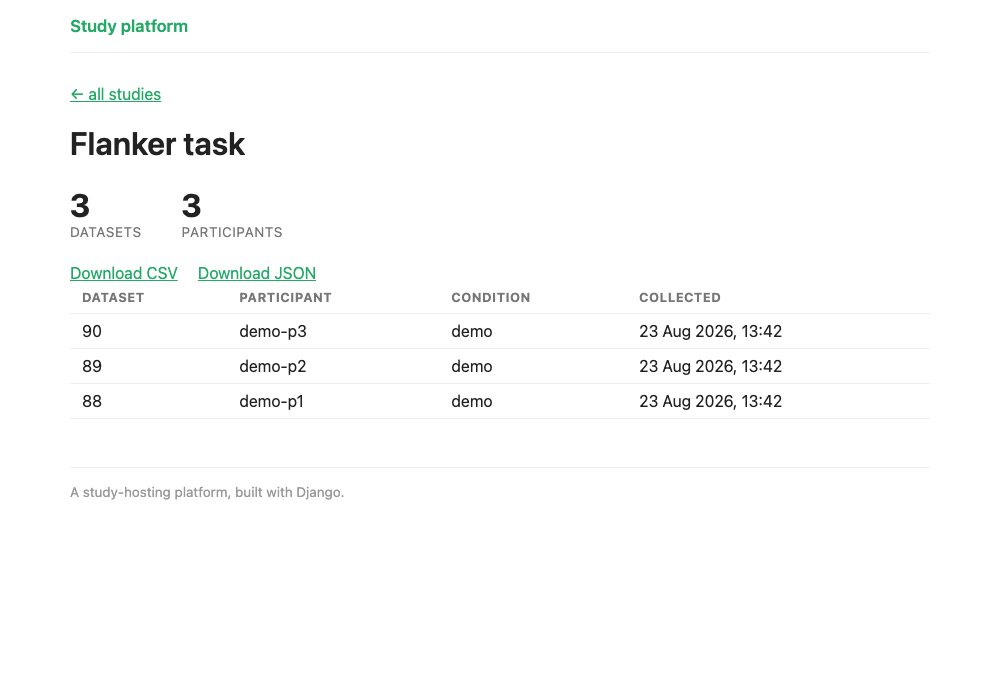
StudyData.objects.create(...)adds one row to the database:Field Value id1studyFlanker task participantp01 conditionAdatathe list of two trial objects, exactly as they were sent createdwhen it was saved (in UTC) -
Server. The view replies
200 OKwith the body{"status": "ok", "id": 1} - Browser.
response.okis true, so the first.thenreads the JSON reply and the second replaces the page with "Thank you, your data has been saved." Had the reply been a400,403or500, or had the network failed,.catchwould show "Sorry, saving failed." and a Try again button instead
So one run of the study is saved as one StudyData row. It doesn't matter whether the run
had two trials or two hundred: they're all stored together, as a list, in that row's
data field. Chapter 5's CSV export later splits them out into one row per trial.
What saving at the end can't do
Sending everything in one go when the study finishes keeps the code short. It also has limits you should know about before you run a real study:
- The data is sent only when the experiment finishes
- Closing or refreshing the page before the end loses this data
- The Try again button depends on the page staying open. It resends the data still held in that page. If the participant closes the tab after "saving failed", the run is gone
- A retry can create a duplicate data entry. If the server saved the data but its reply was lost
on the way back (the connection dropped at just the wrong moment, say), the page
reports a failure. Pressing Try again then saves a second, identical
StudyDatarow. When you analyse your data, check for repeated runs from the same participant
Troubleshooting
403 Forbidden when the data posts. This is a CSRF issue: the CSRF token is missing
or is incorrect. Make sure that your template includes {{ csrf_token }}.
405 Method Not Allowed. Something sent a GET, usually a link or an address-bar
visit to the API URL. The endpoint only takes POST.
The data saves but every field is empty. Check that your jsPsych trials actually
record data. jsPsych.data.get().values() should return populated objects. An empty
timeline posts empty trials.
Checkpoint
The whole of study/templates/study/study_detail.html at this point
If anything above didn't land where you expected, compare against this.
{% load static %}
<!DOCTYPE html>
<html lang="en">
<head>
<meta charset="utf-8">
<title>{{ study.name }}</title>
<link rel="stylesheet" href="{% static 'study/jspsych/jspsych.css' %}">
<link rel="stylesheet" href="{% static 'study/jspsych/survey.min.css' %}">
<script src="{% static 'study/jspsych/jspsych.js' %}"></script>
{% for plugin in jspsych_plugins %}<script src="{% static 'study/jspsych/'|add:plugin %}"></script>
{% endfor %}
</head>
<body>
<script>
const PARTICIPANT_ID = "{{ participant_id|escapejs }}";
const CONDITION = "{{ condition|escapejs }}";
const CSRF_TOKEN = "{{ csrf_token }}";
const DATA_URL = "{% url 'study:data' study.slug %}";
function saveData() {
    const message = html => document.body.innerHTML =
        "<div style='text-align:center;margin-top:3em;'>" + html + "</div>";

    message("<p>Saving your data, please don't close this window...</p>");
    return fetch(DATA_URL, {
        method: "POST",
        mode: "same-origin",                       // don't send the CSRF token off-origin
        headers: {"Content-Type": "application/json", "X-CSRFToken": CSRF_TOKEN},
        body: JSON.stringify({
            participant_id: PARTICIPANT_ID,
            condition: CONDITION,
            trials: jsPsych.data.get().values()
        })
    })
        .then(response => {
            if (!response.ok) throw new Error("HTTP " + response.status);  // 4xx/5xx isn't success
            return response.json();
        })
        .then(result => {
            message("<p>Thank you, your data has been saved.</p>");
        })
        .catch(() => {
            // keep the data in the page and let them retry rather than losing the run
            message("<p>Sorry, saving failed.</p>" +
                "<button onclick='saveData()'>Try again</button>");
        });
}

const jsPsych = jsPsychModule.initJsPsych({ on_finish: saveData });
let timeline = [];
{{ study.code|safe }} {# the researcher's pasted timeline goes here #}
jsPsych.run(timeline);
</script>
</body>
</html>
Run the study at /study/flanker/?participant_id=p01&condition=A, finish it, and you should see "Thank you, your data has been saved."
Open the admin at /admin/, look under Study data, and your run is there, with the
whole trial array in its data field. Under Participants you'll find p01.
We've completed data capture now. Chapter 4b adds two finishing touches: sending participants back to Prolific, and a preview mode that saves nothing.