Sharing page layout: template inheritance
About 25 minutes
In chapter 5 you built an HTML dashboard. Here, you'll add another page that shows a list of studies. Both the dashboard and third new page, use the same header, footer and styling. Rather than copying that shared code into
every page, we use template inheritance: the shared code lives once, in base.html,
and each page builds on it.
A studies list
The new page needs a view. Add it to study/views.py:
def study_list(request):
    """Public landing page: every study on the platform.

    This page is public (participants land here), so it shows no dataset counts and no
    links to the staff-only dashboard.
    """
    studies = Study.objects.all()
    return render(request, "study/study_list.html", {"studies": studies})
Give it the site's home address by adding this line at the top of the urlpatterns list
in study/urls.py:
Don't open the page yet: the view renders a template, study_list.html, that doesn't exist
yet, so you'd get a TemplateDoesNotExist error. That template builds on the shared
layout, base.html, so we'll write base.html first, then the list's template.
The base template
base.html stores everything the pages have in common, {% block %} marking
the gaps each page can fill (if desired). Create
study/templates/study/base.html. Most of it is the shared styling:
<!DOCTYPE html>
<html lang="en">
<head>
  <meta charset="utf-8">
  <meta name="viewport" content="width=device-width, initial-scale=1">
  <title>{% block title %}Study platform{% endblock title %}</title>
  <style>
    body { font-family: system-ui, sans-serif; max-width: 860px; margin: 0 auto; padding: 0 1rem 2rem; color: #222; }
    a { color: #2a6; }
    header.site { border-bottom: 1px solid #eee; padding: 1rem 0; margin-bottom: 2rem; }
    header.site a { text-decoration: none; font-weight: 600; font-size: 1.05rem; }
    footer.site { border-top: 1px solid #eee; margin-top: 3rem; padding-top: 1rem; color: #999; font-size: 0.85rem; }
    h1 { font-weight: 600; }
    table { border-collapse: collapse; width: 100%; }
    th, td { text-align: left; padding: 0.5rem 0.75rem; border-bottom: 1px solid #eee; }
    th { color: #777; font-size: 0.8rem; text-transform: uppercase; letter-spacing: 0.04em; }
    .stats { display: flex; gap: 2.5rem; margin: 1.5rem 0; }
    .stat .num { font-size: 2rem; font-weight: 700; }
    .stat .label { color: #777; font-size: 0.85rem; text-transform: uppercase; letter-spacing: 0.04em; }
    .study { padding: 1rem 0; border-bottom: 1px solid #eee; }
    .study .name { font-size: 1.2rem; font-weight: 600; }
    .study .meta { color: #777; font-size: 0.9rem; }
    .links a, .exports a { margin-right: 1rem; }
    .lede { color: #555; }
    form.stacked p { margin: 0 0 1.25rem; }
    form.stacked label { display: block; font-weight: 600; margin-bottom: 0.25rem; }
    form.stacked input[type=text], form.stacked textarea { width: 100%; padding: 0.5rem; border: 1px solid #ccc; border-radius: 4px; font: inherit; }
    form.stacked textarea { min-height: 14rem; font-family: ui-monospace, SFMono-Regular, Menlo, monospace; font-size: 0.85rem; }
    form.stacked .helptext { display: block; color: #777; font-size: 0.85rem; margin-top: 0.25rem; }
    form.stacked ul.errorlist { list-style: none; margin: 0 0 0.35rem; padding: 0; color: #c0392b; font-size: 0.9rem; }
    button { font: inherit; padding: 0.55rem 1.1rem; border: 0; border-radius: 4px; background: #2a6; color: #fff; cursor: pointer; }
  </style>
</head>
<body>
  {% include "study/menu.html" %}
  {% block content %}{% endblock content %}
  {% include "study/footer.html" %}
</body>
</html>
study/templates/study/base.html on GitHub
There are 2 mechanisms:
{% block %}marks a region a child page can override.base.htmlgives each block a default (the title falls back to "Study platform"), and a child page replaces it{% include %}pulls in a smaller partial. The header and footer live in their own littlemenu.htmlandfooter.htmlfiles, so they're easy to find and reuse
The header and footer
Create study/templates/study/menu.html:
study/templates/study/menu.html on GitHub
and study/templates/study/footer.html:
study/templates/study/footer.html on GitHub
{% url 'study:list' %} builds the link from the URL's name, so the header on every page
points back to the studies list.
A page that extends it
Each page now extends base.html. Create
study/templates/study/study_list.html:
{% extends "study/base.html" %}
{% block title %}Studies{% endblock title %}
{% block content %}
  <h1>Studies</h1>
  {% for study in studies %}
    <div class="study">
      <div class="name">{{ study.name }}</div>
      <div class="links">
        <a href="{% url 'study:detail' study.slug %}?preview=1">Try it (nothing saved) →</a>
      </div>
    </div>
  {% empty %}
    <p>No studies are currently available.</p>
  {% endfor %}
{% endblock content %}
study/templates/study/study_list.html on GitHub
{% extends %}needs to be on every page that extends another.
Replace the whole of study/templates/study/dashboard.html with the below. It
extends base.html too, shows counts, and provide a link back to the list:
{% extends "study/base.html" %}
{% block title %}{{ study.name }} data{% endblock title %}
{% block content %}
  <p><a href="{% url 'study:list' %}">← all studies</a></p>
  <h1>{{ study.name }}</h1>

  <div class="stats">
    <div class="stat"><div class="num">{{ n_datasets }}</div><div class="label">Datasets</div></div>
    <div class="stat"><div class="num">{{ n_participants }}</div><div class="label">Participants</div></div>
  </div>

  <div class="exports">
    <a href="{% url 'study:export_csv' study.slug %}">Download CSV</a>
    <a href="{% url 'study:export_json' study.slug %}">Download JSON</a>
  </div>

  <table>
    <thead>
      <tr><th>Dataset</th><th>Participant</th><th>Condition</th><th>Collected</th></tr>
    </thead>
    <tbody>
      {% for dataset in datasets %}
        <tr>
          <td>{{ dataset.pk }}</td>
          <td>{{ dataset.participant.external_id|default:"–" }}</td>
          <td>{{ dataset.condition|default:"–" }}</td>
          <td>{{ dataset.created|date:"j M Y, H:i" }}</td>
        </tr>
      {% empty %}
        <tr><td colspan="4">No data collected yet. <a href="{% url 'study:detail' study.slug %}?participant_id=demo">Run the study →</a></td></tr>
      {% endfor %}
    </tbody>
  </table>
{% endblock content %}
study/templates/study/dashboard.html on GitHub
There's a catch: if you added the Trials column in
chapter 7's exercise, this will
disappear. To keep it, put back the two lines from the exercise's answer,
<th>Trials</th> and <td>{{ dataset.data|length }}</td>, and change the empty row's
colspan="4" to colspan="5".
The participant's study page, study_detail.html, stays a stand-alone file. jsPsych takes
over the whole page, and saveData replaces the page body when the study ends, so a site
header and footer would only get in the way.
Checkpoint
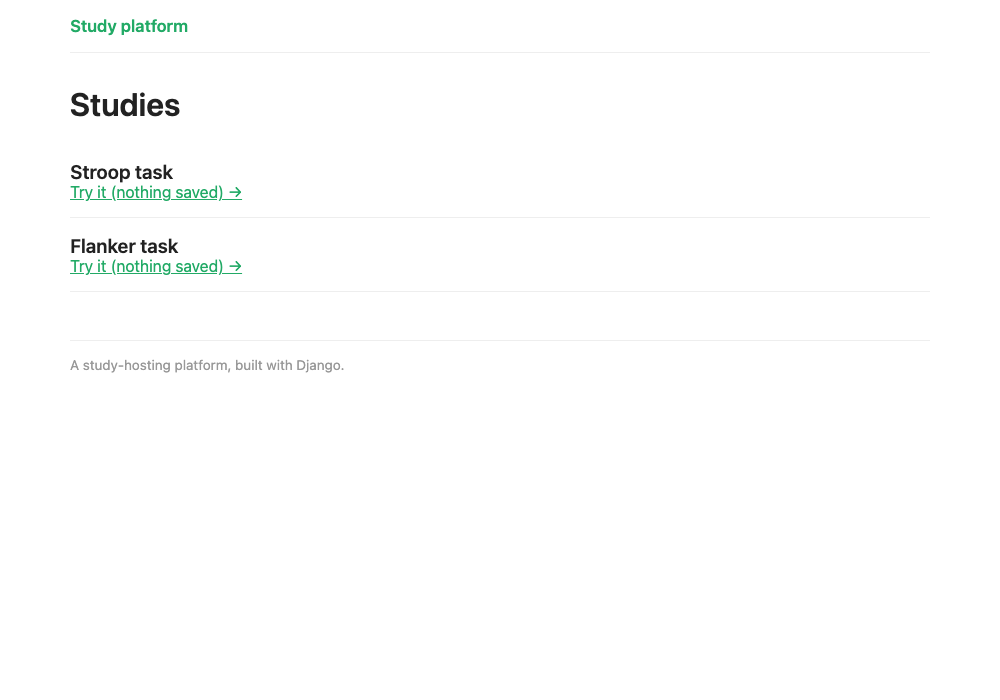
Open http://127.0.0.1:8000/ and you'll see your studies:
Then open /study/flanker/dashboard/. It now has the same header and footer, and looks like
the screenshot at the top of chapter 5.