Registering studies
About 30 minutes
The admin you wired up in chapter 1 is for staff. It lets you add, edit and delete anything in the database, so it isn't the right tool to share with collaborators (or participants).
What you need here is a form.
Before you start
This page builds on Sharing page layout: the form's page extends
base.html, and its URLs sit alongside the studies list. Do that lesson first.
A ModelForm
We already have Study in models.py. A ModelForm builds a form based on it, saving you a lot of time. Create
study/forms.py (a new file):
from django import forms

from .models import Study


class StudyForm(forms.ModelForm):
    class Meta:
        model = Study
        fields = ["name", "slug", "code"]
That's it! From the Meta class Django works out that:
nameis aCharField(max_length=200), so it renders a text input and rejects anything over 200 charactersslugis aSlugFieldthat'sunique=True. It removes spaces and punctuation, and it can't match the slug of a study that's already savedcodeis aTextField, so it renders a textarea- each field's
help_textfrom the model becomes a hint for the user
fields is a whitelist of fields fromStudy you want to show via the form.
A view for both halves
A form does 2 things: it shows data, and it sends data. The view handles both of these scenarios.
It needs two new imports, redirect and your StudyForm. Make the top of study/views.py read:
import csv
import json

from django.contrib.admin.views.decorators import staff_member_required
from django.http import HttpResponse, HttpResponseBadRequest, JsonResponse
from django.shortcuts import get_object_or_404, redirect, render
from django.views.decorators.http import require_POST

from .forms import StudyForm
from .jspsych import plugin_files
from .models import Participant, Study, StudyData
Then add the view below the others:
# The `code` field is JavaScript that runs in every participant's browser, so this form
# is staff-only, exactly like the dashboard. See the "Registering studies" page in Going
# further before opening it to a wider group.
@staff_member_required
def study_create(request):
    """Register a study from a form on the site, rather than through the admin.

    One view handles both halves of a form's life. A GET renders an empty (*unbound*)
    form; a POST hands the submitted data back to the same form class to check. If it
    validates, ``form.save()`` writes the ``Study`` row and we send the researcher
    straight to their new study. If it doesn't, the same template is rendered again with
    the errors attached to the fields that caused them, and nothing is saved.
    """
    if request.method == "POST":
        form = StudyForm(request.POST)
        # is_valid() runs every field's own checks plus the model's, so the unique=True on
        # Study.slug becomes a "this slug is taken" message rather than a database error.
        if form.is_valid():
            study = form.save()
            return redirect("study:detail", slug=study.slug)
    else:
        form = StudyForm()
    return render(request, "study/study_form.html", {"form": form})
@staff_member_required makes sure that only staff members can access this view. It is important here: code is JavaScript that runs in every participant's browser, so only people you trust should be able to write it (such as collaborators, see Where this goes next).
When the page is opened for the first time, request.method == "GET". When someone clicks submit, request.method == "POST".
- GET (someone opened the page): build an empty form and render it
- POST (someone submitted the form): build the form from the submitted data, and ask it
is_valid(). If yes,form.save()writes the row to the database and we redirect. If the data is not valid, we rerender the form with the problematic data alongside useful error messages
A template
{{ form.as_p }} is powerful and generates code for every field (label, help text and any errors). Create study/templates/study/study_form.html:
{% extends "study/base.html" %}
{% block title %}Register a study{% endblock title %}
{% block content %}
  <h1>Register a study</h1>
  <p class="lede">
    Paste your jsPsych timeline into <strong>Code</strong>. The platform wraps it with the
    jsPsych library and the data-capture plumbing when it serves your study.
  </p>

  {# method="post" because this changes the database; a GET should never do that. #}
  <form method="post" class="stacked">
    {# Django refuses the POST without this token. See chapter 4. #}
    {% csrf_token %}
    {# as_p renders each field, its label, its help text and any errors, in a <p>. #}
    {{ form.as_p }}
    <button type="submit">Register study</button>
  </form>
{% endblock content %}
study/templates/study/study_form.html on GitHub
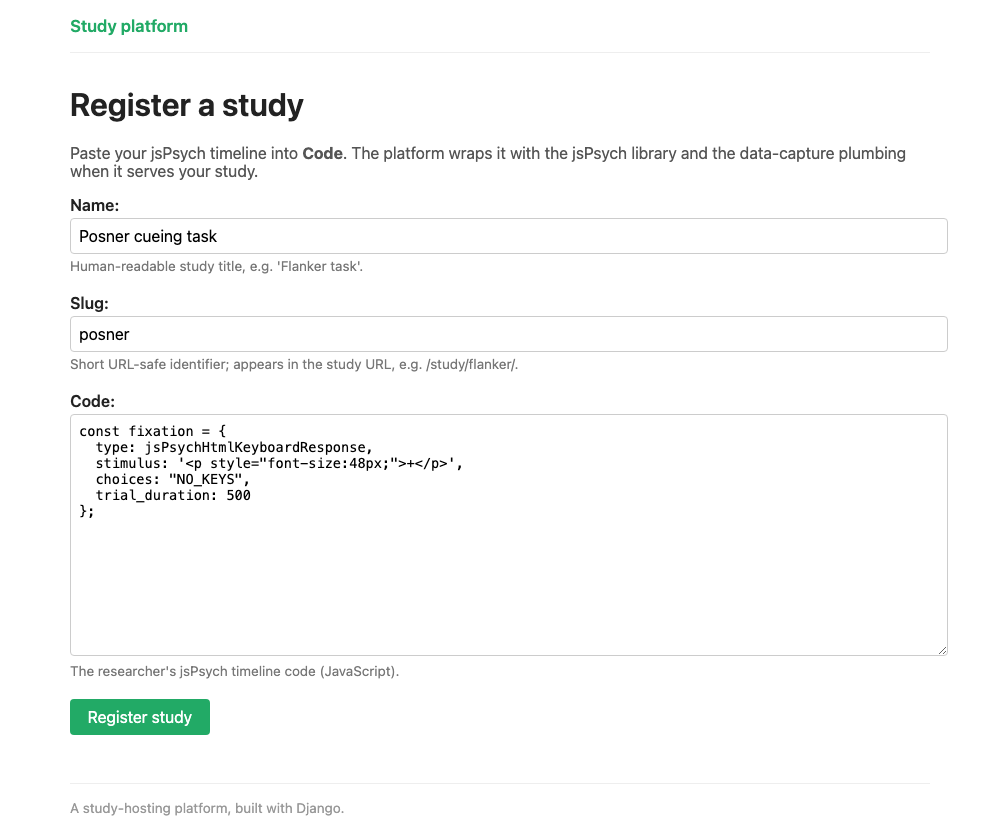
ModelForm.{% csrf_token %} is required. Django will refuse the POST without it. It's the same protection the study page uses to send its data, explained in chapter 4a (open "Two advanced points"). There, JavaScript sends the token in a header; here, {% csrf_token %} adds it to the form as a hidden field, and the browser sends it along with everything else.
If as_p is too coarse, you can render fields one at a time ({{ form.name.label_tag }},
{{ form.name }}, {{ form.name.errors }}) and lay them out however you like.
The URL
Add this line to urlpatterns in study/urls.py, above the study/<slug:slug>/ pattern:
The whole file should now read:
from django.urls import path

from . import views

app_name = "study"

urlpatterns = [
    # / – landing page listing every study
    path("", views.study_list, name="list"),
    # /study/new/ – register a study through a form instead of the admin (staff only).
    # This must come *before* the <slug> pattern below, or "new" would be matched as a
    # slug and we'd 404 looking for a study called "new".
    path("study/new/", views.study_create, name="create"),
    # /study/<slug>/ – serve a study to a participant, e.g. /study/flanker/
    path("study/<slug:slug>/", views.study_detail, name="detail"),
    # /api/study/<slug>/data – jsPsych POSTs the trial data here at on_finish
    path("api/study/<slug:slug>/data", views.submit_data, name="data"),
    # researcher-facing views: dashboard + data export
    path("study/<slug:slug>/dashboard/", views.dashboard, name="dashboard"),
    path("study/<slug:slug>/export.csv", views.export_csv, name="export_csv"),
    path("study/<slug:slug>/export.json", views.export_json, name="export_json"),
]
Note where study/new/ sits. URL patterns are matched in order, and study/<slug:slug>/
would happily match /study/new/ and go looking for a study called "new". The specific
pattern goes above the general one.
A link to the form
Right now the only way to reach the form is to type its address. Let's add a link to it on
the studies list. Open study/templates/study/study_list.html and add these lines just
below <h1>Studies</h1>:
{% if user.is_staff %}
  <p class="links"><a href="{% url 'study:create' %}">Register a study →</a></p>
{% endif %}
study/templates/study/study_list.html on GitHub
Participants see the studies list too, so the {% if user.is_staff %} check shows the link
only to logged-in staff. Everyone else sees the page exactly as before.
Try it
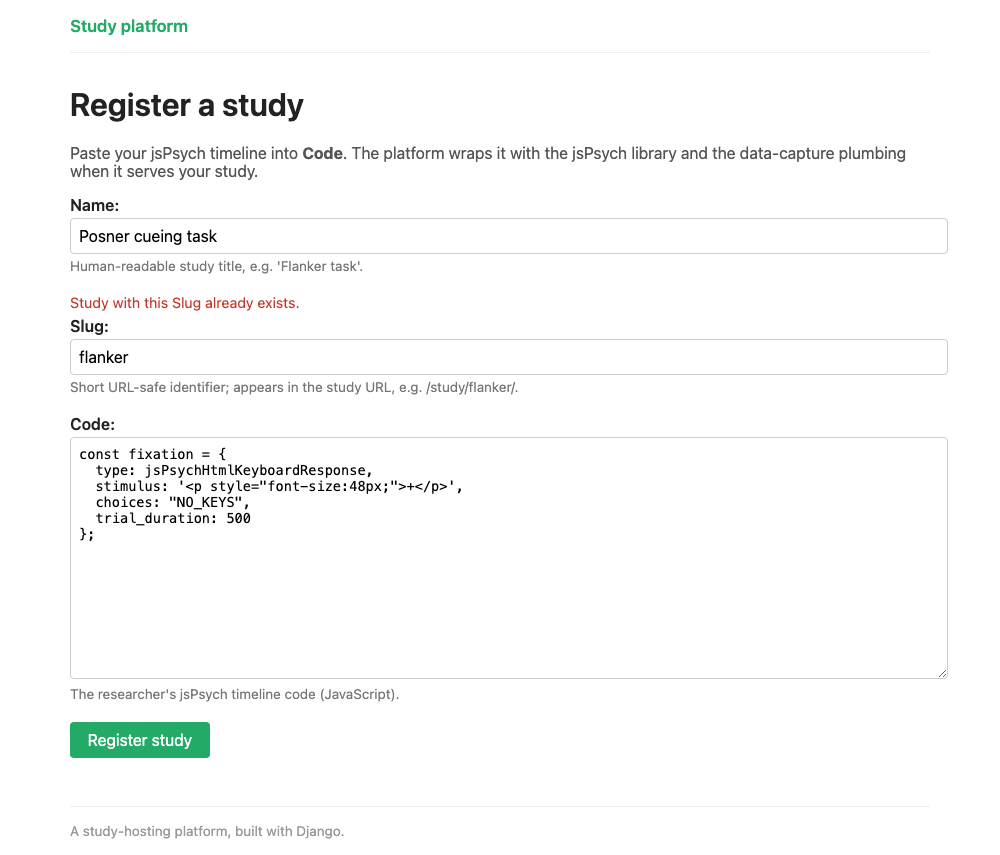
Log in at /admin/, then open http://127.0.0.1:8000/study/new/ (or follow the link from the studies list). Submit it without entering any data and you'll see the errors that are reported back to the user automatically. Give it a slug
that's already taken (e.g. flanker) and the form tells you of this mistake. Fill it in properly and you're sent straight to your new study.
Test it
The form saves data to your database, so it's best to write tests for it. The form is staff-only, so the test needs a logged-in staff user. Add get_user_model to the imports at the top of study/tests.py:
then add this new class at the bottom of the file. setUp runs before every test in the class, creating a staff user and logging the test client in as them:
class StudyFormTests(TestCase):
    """Registering a study through the site's own ModelForm (``study/forms.py``)."""

    def setUp(self):
        staff = get_user_model().objects.create_user("registrar", password="pw", is_staff=True)
        self.client.force_login(staff)

    def test_valid_post_creates_the_study(self):
        response = self.client.post(
            reverse("study:create"),
            data={"name": "Posner cueing task", "slug": "posner", "code": "timeline.push();"},
        )

        # A successful save redirects to the new study, so the researcher can try it.
        self.assertRedirects(response, reverse("study:detail", args=["posner"]))
        study = Study.objects.get(slug="posner")
        self.assertEqual(study.name, "Posner cueing task")
Run uv run python manage.py test again. You should see Ran 5 tests and OK.
The full set in study/tests.py also checks that an anonymous visitor is turned away,
that a taken slug is reported rather than saved, and that the fields left out of fields
really are absent from the rendered page.
Where this goes next
These tools (a ModelForm, a view that forks on the method, a template with
{% csrf_token %}) can be used to build a consent page, a debrief
questionnaire, or a demographics form for participants who came in without a recruitment ID. To let collaborators register their own studies, give each of them a login and link it to a Researcher. Then decide who reviews new code before participants see it.